Translate missing strings in @wordpress/dataviews
Published: – Leave a comment
With @wordpress/dataviews, you can build feature-rich lists of data. But as soon as you check it in a non-English language, you’ll see missing translations.
It seems that localizability was not a top priority within these data views, since this issue is persistent since the early days of the package. I already filed an issue within the Gutenberg project, but it seems to be like that by design.
The problem
Your own strings are translated just fine (if loaded correctly). But some parts, i.e. the “Add filter” button, the list of options to change the view from table to list, the pagination and the design options “Filter by”, “Order”, “Density”, “Items per page” and “Properties” are not translated at all and keep English.
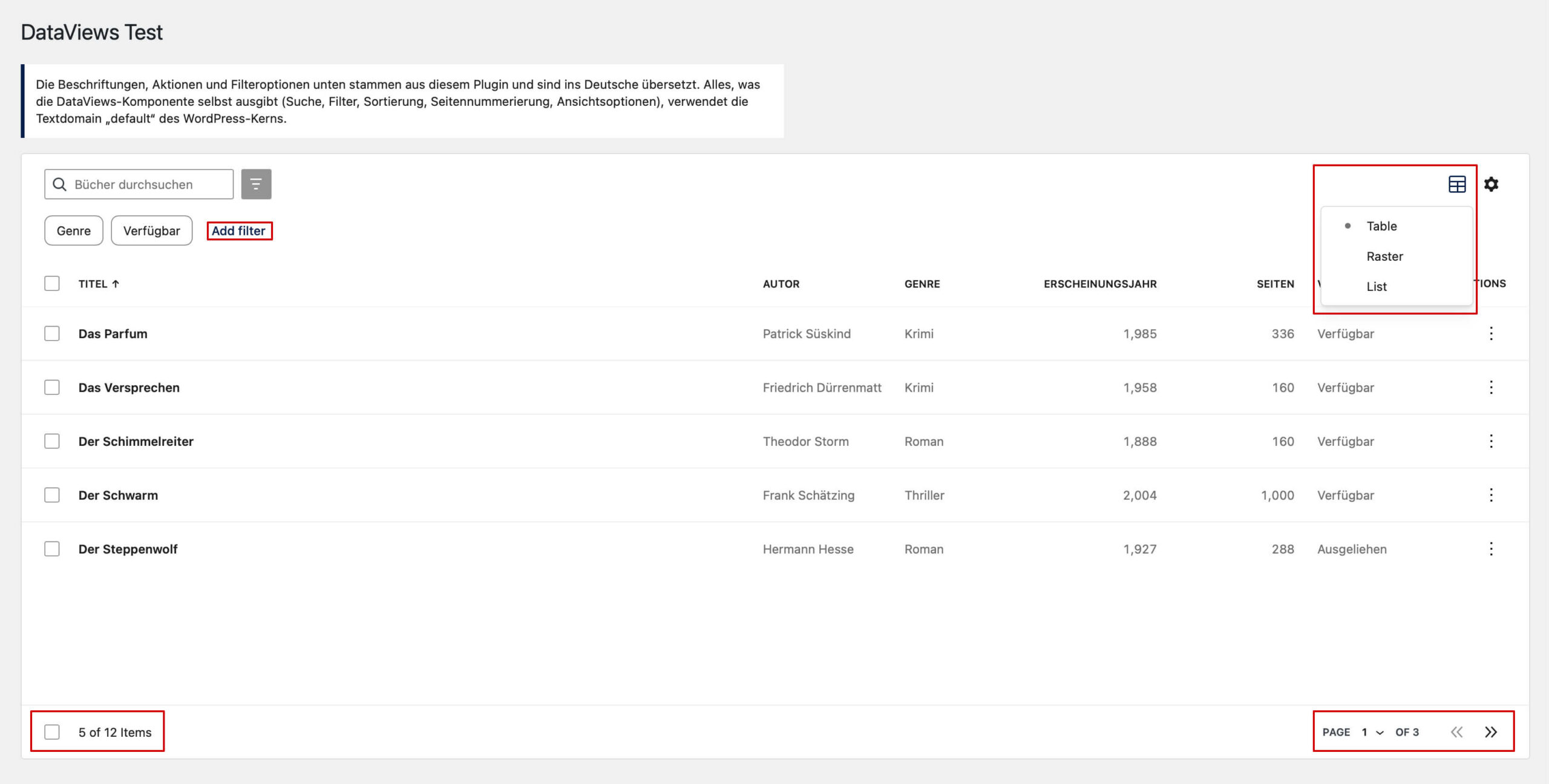
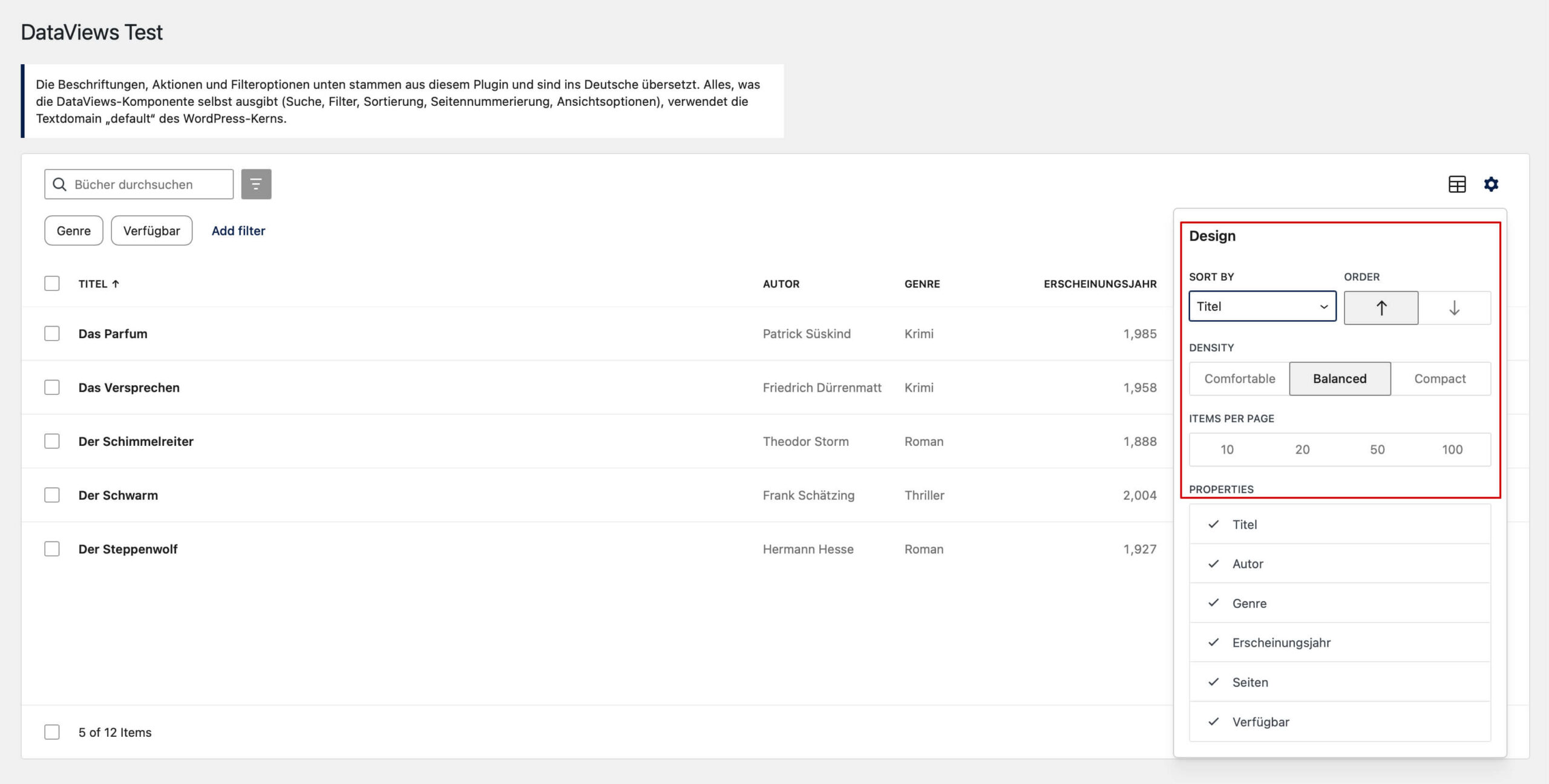
The system loads these – translatable – strings without any textdomain, so e.g. just with __( 'Add filter' ) and thus relies on WordPress Core to have such a string translated. And also, it would require loading those translations for your own script file, which WordPress Core never does.
The solution
First, the strings have to be translated within your own file just like any other string. Then, these strings have to be copied into the default textdomain via setLocaleData().
Extracting strings
With wp i18n make-pot, you can extract translatable strings from plugins. However, it doesn’t scan files inside node_modules, neither does it scan .mjs files, which is what build-module of current @wordpress/* packages contains.
So copy the package’s build-module into a temporary directory, rename .mjs to .js, and run make-pot there with --ignore-domain (the strings have no domain):
copyModules( SOURCE, path.join( temp, 'src' ) );
execFileSync( 'wp', [
	'i18n', 'make-pot',
	path.join( temp, 'src' ),
	path.join( temp, 'dataviews.pot' ),
	'--ignore-domain',
	'--skip-php', '--skip-block-json', '--skip-theme-json', '--skip-audit',
] );
Code language: JavaScript (javascript)
Make the strings available in your plugin
Now you need to add those strings to your plugin, e.g. like this:
import { __, _n, _x } from '@wordpress/i18n';

/**
 * Keys of the strings in the locale data, with the context separated by \u0004.
 */
export const KEYS = [ 'Add filter', 'Days ago', '%d Item', /* … */ ];

/**
 * Mark the strings for translation, so they are part of the POT file of the
 * plugin. It is never called.
 */
export function markStrings() {
	__( 'Add filter', 'my-plugin' );
	__( 'Days ago', 'my-plugin' );
	// translators: %d: Number of items.
	_n( '%d Item', '%d Items', 1, 'my-plugin' );
	// …
}
Code language: JavaScript (javascript)
Run wp i18n make-pot afterwards, and the strings are in your POT file.
Copy the translations at runtime
Now, you need to copy the translations from your plugin’s textdomain to the one from WordPress Core, which is default:
import { getLocaleData, setLocaleData } from '@wordpress/i18n';
import { KEYS } from './dataviews-strings';

export function addDataViewsTranslations() {
	const translations = getLocaleData( 'my-plugin' ) || {};
	const existing = getLocaleData( 'default' ) || {};
	const data = {};

	for ( const key of KEYS ) {
		const translation = translations[ key ];

		if ( ! existing[ key ] && Array.isArray( translation ) && translation.some( Boolean ) ) {
			data[ key ] = translation;
		}
	}

	if ( Object.keys( data ).length ) {
		setLocaleData( data, 'default' );
	}
}

addDataViewsTranslations();Code language: JavaScript (javascript)
If there is already a translation available for the string, the one from WordPress Core is used.
Load it before DataViews
Make the module the first import of your entry point:
import './i18n';
import { DataViews } from '@wordpress/dataviews';
Code language: JavaScript (javascript)
ES modules are evaluated in import order, so this runs before any DataViews module and before any of its module-level __() calls.
Translate, and map the files correctly
Translate the new strings like any other plugin string. For consistency, take the translations WordPress already uses. In my case, 152 of the 154 DataViews strings could be taken from there.
Then create your JSON files with wp i18n make-json.
Note: Map every source file to your bundle with --use-map, including the generated module. Otherwise its strings end up in a JSON file named after the source path, which WordPress never loads. Generating the map from your source directory means new files can’t be forgotten: const map = {}; for ( const file of getFiles( 'src' ) ) { map[ file ] = 'build/index.js'; } execFileSync( 'wp', [ 'i18n', 'make-json', 'languages', '--pretty-print', `--use-map=${ JSON.stringify( map ) }` ] );
Keeping it up to date
When you update @wordpress/dataviews, its strings may change. Run the generator again, then update your POT and PO files.
Conclusion
To me, the whole solution sounds more like a workaround for a real WordPress Core issue. I hope this gets addressed sooner than later (especially since WordPress itself is very translation-friendly). Until then, there’s most likely no way around it, unfortunately.
Likes
Reposts